ADA website compliance means people with disabilities can use your store’s website to find a product and buy it, and the yardstick everyone uses is a standard called WCAG 2.1 AA. If you sell to customers in the US, assume it applies to you: online stores are the target of most website accessibility lawsuits, and there is no small-business exemption.
This guide is for store owners on Shopify, WooCommerce or WordPress who aren’t developers. It covers what the law actually asks for, why the “April 2026 deadline” you may have read about isn’t yours, and what we found when we checked 10 pages from five popular store themes.
Does the ADA apply to your online store?
Title III of the Americans with Disabilities Act covers businesses open to the public. The Department of Justice’s 2022 guidance on web accessibility says that includes the goods and services they offer online. Title III has no minimum business size: a one-person store is covered the same way a national retailer is.
Federal courts don’t fully agree on whether a store with no physical location counts. That hasn’t slowed anything down. Of the 5,114 digital accessibility lawsuits filed in the US in 2025, 70% targeted ecommerce and 64% hit companies with less than $25 million in revenue, according to UsableNet’s 2025 report. That total includes 1,919 cases in New York and California state courts, where state laws apply on top of the ADA.
If you see smaller numbers elsewhere, check what is being counted: some trackers count federal website cases only.
What a lawsuit asks for. A federal ADA case by a customer seeks a court order to fix the site, plus the customer’s attorneys’ fees. State laws can add money damages: California’s Unruh Act starts at $4,000. Many cases begin with a demand letter rather than a filed suit.
This guide explains what to check and how to fix it. It isn’t legal advice. If you’ve received a letter or a lawsuit, talk to a lawyer.
What the requirements look like on a store
The ADA itself doesn’t list technical rules for websites, and the DOJ hasn’t written any for private businesses. In practice, demand letters and settlements measure sites against WCAG 2.1 Level AA, a public standard with about 50 testable checks. You don’t need to read it. On a store, it comes down to these places:
- Menus and navigation. Every link and button works with the Tab key, and you can always see which one is selected. A “skip to content” link lets keyboard users jump past the menu.
- Product pages. Product photos have a short text description (alt text). Text and prices are dark enough to read against their background: a contrast ratio of at least 4.5:1 for normal text and 3:1 for large text. Size and color options say what they are, including when one is sold out.
- Cart and checkout. Every field has a visible label, error messages say what went wrong in words, and quantity buttons and Add to cart work without a mouse.
- Forms. Newsletter, contact and account forms follow the same rule: a label on every field.
- Phones. People can pinch to zoom, and the page still works when text is enlarged to 200%.
- Video. Product and brand videos have captions.
None of this is about how the site looks to you. It’s about whether someone who can’t see the screen, can’t use a mouse or needs to zoom in can still buy from you.
The April 2026 deadline is not your deadline
If you’ve read that websites had to be ADA compliant by April 2026, that date came from a different part of the law. In 2024 the DOJ set WCAG 2.1 AA as the rule for state and local government websites under Title II. The first deadline was April 24, 2026.
On April 20, 2026, the DOJ pushed those dates back: to April 26, 2027 for governments serving 50,000 people or more, and April 26, 2028 for smaller ones. The rule says plainly that it doesn’t cover Title III, the part that applies to private businesses.
So for a store, there is no deadline and no grace period. Customers can bring a claim any time, and the Title II rule doesn’t change that. It matters in two smaller ways:
- It put WCAG 2.1 AA in writing as the government’s standard, which makes it even more likely to be the bar a claim measures your site against.
- If you sell to a city, county or state agency, its contracts may pass the requirement on to you.
What we found on 5 popular store themes
Your theme decides most of your result. On November 6, 2026 we checked 10 pages from the official demo sites of five popular themes: a homepage and one product or inner page each. One theme came through with no real automated failures. The other four each had a problem on something a shopper uses.
| Theme | Platform | What we found |
|---|---|---|
| Astra (Electronic Store demo) | WooCommerce | Brand blue just under the contrast minimum; pale grey text; weak keyboard focus on Add to cart |
| Avada (eCommerce demo) | WooCommerce | Category links with no name; low-contrast green buttons; unlabeled search dropdown; no keyboard focus on Add to Cart |
| Impact (Sound demo) | Shopify | Pinch zoom blocked on phones; 20 Tab presses to reach the menu; dimmed text |
| GeneratePress (Designer starter site) | WordPress | Social media icons with no name |
| Dawn | Shopify | No real automated failures; clear keyboard focus |
Our scanner reached 8 of the pages, with scores from 66 to 95 out of 100. The GeneratePress demo blocks automated scanners, so we checked its 2 pages by hand and with a browser testing tool.
The WebAIM Million study tracks the six failures found most often on home pages across the web. Here’s how often each showed up in the 10 pages we checked:
| Failure | Pages with it (of 10) | Home pages with it, WebAIM 2026 |
|---|---|---|
| Low contrast text | 6 | 83.9% |
| Links with no name | 5 | 46.3% |
| Form fields with no label | 2 | 51% |
| Images with no alt text | 0 | 53.1% |
| Buttons with no name | 0 | 30.6% |
| Page language not set | 0 | 13.5% |
Alt text depends mostly on the product photos you upload, and demo stores come with tidy content, so your own store may do worse there. Contrast, unnamed links and unlabeled fields come from the theme, so they follow you onto your store.
Colors that miss by a hair
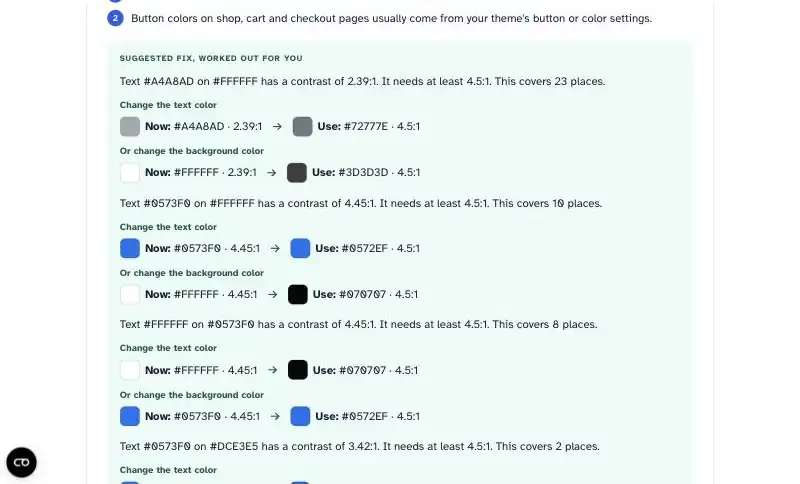
Astra’s default blue, #0573F0, measures 4.45:1 against white. The minimum is 4.5:1. That small gap fails 10 links and 8 buttons on the demo homepage. Light grey text (#A4A8AD) is a bigger miss at 2.39:1. Avada’s white text on its bright green buttons measures 2.40:1.

Links a screen reader can’t name
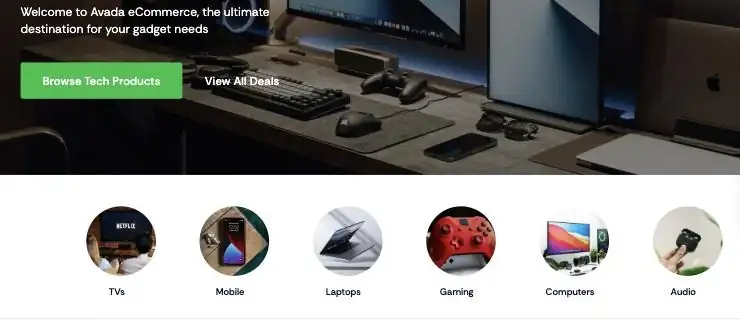
Avada’s homepage shows six round category pictures: TVs, Mobile, Laptops and so on. Each is a link that holds only a background image, so a screen reader announces “link” six times with nothing to say where each goes. GeneratePress’s Designer starter site has the same problem with six social media icons in the footer, on every page. If you build your store from a starter site, you inherit this.

Things that only show up on a phone or a keyboard
Impact blocks pinch zoom. Someone with low vision who tries to enlarge a product photo or a price on their phone can’t. Its scrolling announcement bar shows two messages but repeats them in hidden copies for the animation, so a keyboard user has to press Tab 20 times before reaching the main menu.

The one that passed
Shopify’s free Dawn theme had no real automated failures on either page. Every control we tried showed where the keyboard was, and sizes that are sold out are announced as unavailable to screen reader users. It shows that a good theme gets you most of the way before you change anything.
How to check your store in 10 minutes
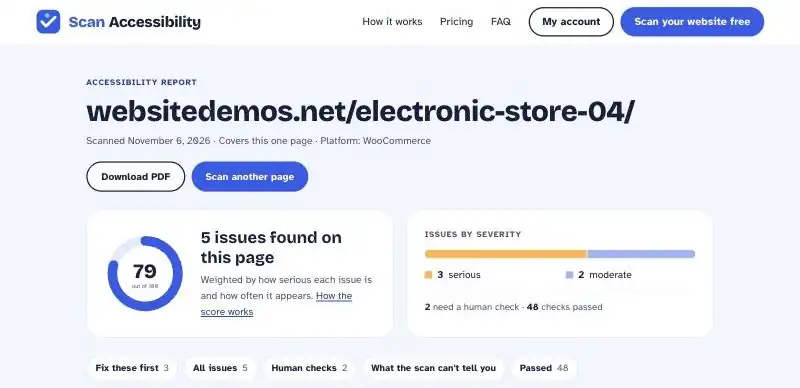
Start with an automated scan of your homepage and your best-selling product page. A scan is fast at the things a machine can measure: text contrast, images with no alt text, fields with no label, links and buttons with no name, the page language, and whether zoom is blocked. That covers a big share of what goes wrong, but not all of it.
Then spend 10 minutes on what only a person can check:
- Keyboard. Click the address bar, then press Tab repeatedly until you reach Add to cart on a product page. At every step you should be able to see where you are. If the highlight disappears, keyboard users are lost.
- Zoom. On a computer, zoom the browser to 200%. Nothing should overlap or get cut off. On a phone, try to pinch-zoom a product photo.
- Screen reader. Turn on VoiceOver on a Mac (Command + F5) or install NVDA, a free screen reader for Windows. Move through one product page and listen. Does each button say what it does? Do images say what they show?
- Alt text. A scan only checks that a description exists. Read a few of yours. “IMG_4032” or a repeated product name doesn’t help anyone.
The keyboard check is where themes differed most. Both screenshots below show Add to cart right after a keyboard user lands on it. No automated scan flagged either one.
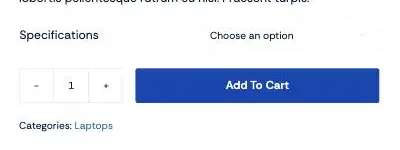
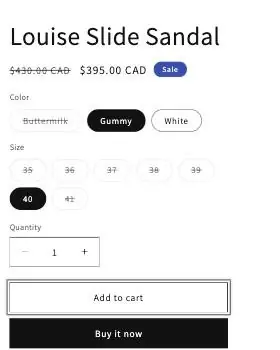
We also found a problem a scan can only hint at. On Avada’s product page, the option dropdowns share their internal IDs with the product forms further down the page, so one dropdown ends up with three labels, one of them empty. A screen reader user hears the wrong thing, or nothing, when choosing a laptop’s specifications.
Want the full list to work through? Our ADA website compliance checklist covers 15 checks, how to do each one without a developer, and which ones a scan finds for you.
Why an accessibility widget is not a fix
Accessibility widgets, sometimes called overlays, add a small toolbar to your site with options like bigger text or higher contrast. Some promise compliance with one line of code.
They don’t change your theme’s code. A link with no name still has no name, an unlabeled field is still unlabeled, and a hidden keyboard focus stays hidden. The visitor who needs those fixed most often uses their own screen reader or zoom settings, not your toolbar.
The lawsuit data agrees. UsableNet’s monthly figures for 2025 add up to 1,416 lawsuits against sites that already had an accessibility widget installed.
A widget can be a nice extra for visitors who like it. It can’t replace fixing the problems in your theme and content.
Where the fixes live on Shopify, WooCommerce and WordPress
Most of what we found sits in theme settings, not in code. Here is where to look first on each platform.
Shopify. Colors live in Online Store > Themes > Customize > Theme settings > Colors. Change the color scheme for the section with the problem, save, and rescan. Alt text for product photos is in Products: open the product, click the image and add alt text. Some fixes sit in the theme’s code, like Impact’s zoom block, which is one line in the theme files. For those, ask a Shopify developer or the theme’s support.
WooCommerce. Your theme’s color settings usually control buttons, prices and links across shop, cart and checkout. On Astra they’re the global colors in the Customizer. Product photo alt text is in Products > All Products: open the product, click the image and fill in Alternative Text. Avada’s demo turns keyboard focus outlines off for the whole site. If your theme does the same, turning them back on is a single change for a developer, and it fixes every button at once.
WordPress (any site). Alt text lives in the Media Library. Icon-only links, like social icons, need a text label: check the icon block’s settings, or ask your developer to add one. Contact and newsletter form plugins have their own label settings; make sure every field shows one.
You don’t have to work out new colors yourself. When a scan finds low contrast, the report suggests the closest colors that pass, so your design changes as little as possible.
What to do this week
- Scan your homepage and your best-selling product page. Write down the score and the issues so you have a starting point.
- Fix the theme-level issues first. Contrast and unnamed links usually sit in theme settings, and one change fixes them on every page.
- Do the 10-minute manual check. Keyboard, zoom, a quick screen reader pass and a look at your alt text. Note anything that doesn’t work.
- Don’t count on a widget. If you have one, keep it if you like it, but fix the underlying issues anyway.
- Keep a dated record. Note what you checked, what you fixed and when. Settlements often turn on whether a business made a good-faith, documented effort, and a record also shows you what to recheck after a theme or plugin update.
If you want to rescan after every fix or theme update, the paid plan gives you more scans and a PDF report you can hand to your developer.
FAQ
Do websites have to be ADA compliant?
If your business is open to the public in the US, plan as if yours does. The DOJ says Title III covers what businesses offer online, and online stores are where most website accessibility lawsuits land. Courts still disagree on stores with no physical location, which is not a reason to wait.
Is my website ADA compliant?
There is no official certificate, so nobody can tell you yes for certain. What you can do is check your site against WCAG 2.1 AA: an automated scan for the issues a machine can find, plus the 10-minute manual check above for the rest.
Who does ADA website compliance apply to?
Private businesses open to the public fall under Title III, with no minimum size. State and local governments fall under Title II, which has its own deadlines in 2027 and 2028.
Can I be sued if my website is not ADA compliant?
Yes. 5,114 digital accessibility lawsuits were filed in the US in 2025, and most targeted online stores. Many start as a demand letter. A federal case asks for the site to be fixed plus attorneys’ fees, and some state laws add money damages. If you receive a letter, talk to a lawyer.
Are Shopify websites ADA compliant?
Shopify itself doesn’t make your store compliant or non-compliant; your theme and content do. In our checks, Shopify’s free Dawn theme had no real automated failures, while the paid Impact theme blocked pinch zoom on phones. Test your theme’s demo before you buy it.